

Your Control Panel
Your Constellation Design hosting account comes equipped with its own control panel, from which you can make adjustments and monitor the activities of your website and e-mail addresses. To access your control panel, point your browser to:
http://yourdomain.com/cpanel/ (substituting your actual domain name for yourdomain.com)
You will then be prompted for your login name and password. Once logged in, you will see the control panel’s main menu:
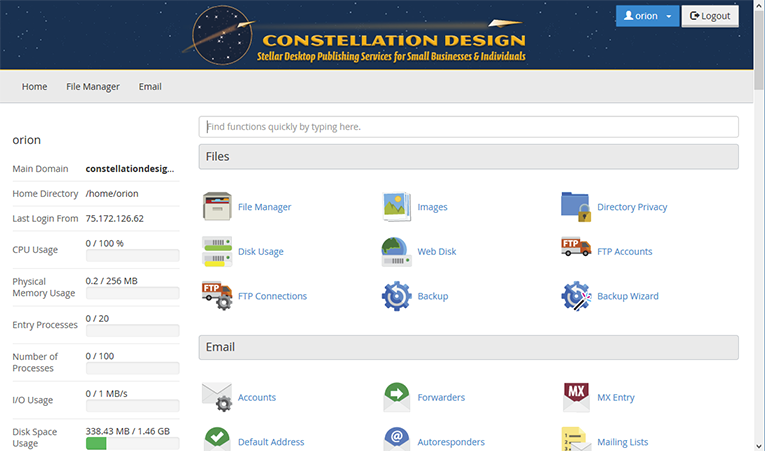
On the left of the main menu is information about your account and the servers it is housed on. From here you can see how many of your site’s resources are being used—how much of your allotted disk space and bandwidth, number of e-mail accounts, databases, etc. On the right is an array of options separated by topic, e.g. “Files” and “Mail.” Clicking on those icons brings you to a new page with an interface to make corresponding adjustments to your account.
The features most often utilized will likely be “E-Mail Accounts,” “File Manager,” and the various options under “Metrics” (File Manager and Email are also on a link menu up top). These features, respectively, allow you to add/delete/modify e-mail accounts for your domain; add or remove files from your website; and track the bandwidth usage and visitor activity of your website. Other features may or may not be of interest depending on your site needs and/or comfort level with working with the guts of a website. They include placing subdomains on your primary domain, password-protecting specific parts of your website, prohibiting image links from outside websites, adding and maintaining MySQL databases, Cron jobs, and script add-ons. The number of features available will depend on which of Constellation’s hosting packages your account is using: Red Dwarf, Main Sequence, or Blue Giant.
Feel free to browse through your control panel’s options and tutorials—you can’t hurt anything just by looking. If you are curious about its features and would like a consult on their usage on your site, feel free to call or e-mail and ask!